I recently upgraded from a UniFi Dream Machine (UDM) to a UniFi Dream Router 7 (UDR7) to better utilize my 10Gbps broadband connection.
I started using UniFi products about 5 years ago when I bought the UDM. It was a great device that served me well for the past 5 years.
However, I felt it was time to upgrade to something more powerful for my 10Gbps connection.
Unbox & Initial Setup
The overall packaging is high quality. The box is made of thick cardboard and has a premium feel to it. Also, it felt like a different style from the UDM packaging.
In the box:
- UDR7 unit (with built-in Wi-Fi 7 AP)
- Power adapter
- Quick start guide
Ports on the back:
- 1× 10G SFP+ WAN
- 1× 2.5 GbE RJ45 WAN
- 3× 2.5 GbE RJ45 LAN
- 1× microSD expansion slot
For full specifications, see the UDR7 Tech Specs page.
Setup Steps:
- Connect & power on — Plugged the ISP modem into the 2.5GbE WAN port and powered on the UDR7.
- Adopt via UniFi app — Opened the UniFi mobile app, which detected the UDR7 automatically and walked through the initial setup wizard.
- Firmware update — Updated to the latest firmware before configuring anything else.
I chose to start fresh rather than restoring a backup from the UDM since it's a rather straightforward setup and I wanted to make sure everything is clean and fresh.
VLAN Setup
To keep everything secure and organized, I've segmented my network using VLANs. Here is the layout of my current setup:
| Role | VLAN ID | Subnet | Security Logic |
|---|---|---|---|
| Control | 1 (Default) | 10.0.1.1/24 | Unifi devices only. |
| Trusted | 10 | 10.0.10.1/24 | Primary dev environment. No isolation. |
| IoT | 20 | 10.0.20.1/24 | Mainly for 2.4GHz devices. |
| Guest | 30 | 10.0.30.1/24 | Guest Network with Hotspot Portal. |
| Media | 40 | 10.0.40.1/24 | TV and Consoles. |
Note: UniFi by default allows inter-VLAN traffic. To restrict traffic between VLANs, enable Network Isolation:
Network Isolation
For those looking for a simplified, one-click solution, UniFi offers Network Isolation, which automatically configures the necessary firewall rules to block inter-VLAN traffic. To enable:
- Navigate to Settings > Networks.
- Select the desired network or VLAN.
- Enable Network Isolation.
This is the most common way to restrict traffic between VLANs with minimal setup.
DNS and Security
- DNS over HTTPS (DoH): The UDR7 is configured to encrypt DNS queries, preventing external visibility into browsing activity.
- IPS/IDS: Intrusion Prevention and Detection Systems are enabled to actively monitor and block network threats.
Wi-Fi 6E vs Wi-Fi 7
The UDR7 supports Wi-Fi 7, which improves upon the 6GHz band introduced in Wi-Fi 6E with wider channels and higher modulation. The table below outlines theoretical and estimated real-world comparisons:
| Channel Width | Wi-Fi 6E (PHY Rate) | Wi-Fi 7 (PHY Rate) | Real-World Throughput (Est.) |
|---|---|---|---|
| 80 MHz | 1,201 Mbps | 1,441 Mbps | ~800–900 Mbps |
| 160 MHz | 2,402 Mbps | 2,882 Mbps | 1.4–1.6 Gbps |
| 320 MHz | Not Supported | 5,765 Mbps | 3.5–3.8 Gbps |
Since all of my devices only support up to Wi-Fi 6E, I'm not able to fully utilize the UDR7's Wi-Fi 7 capabilities yet :(
Speed Test Results
MacBook Pro 14" over Wi-Fi 6E (6 GHz, 160 MHz):
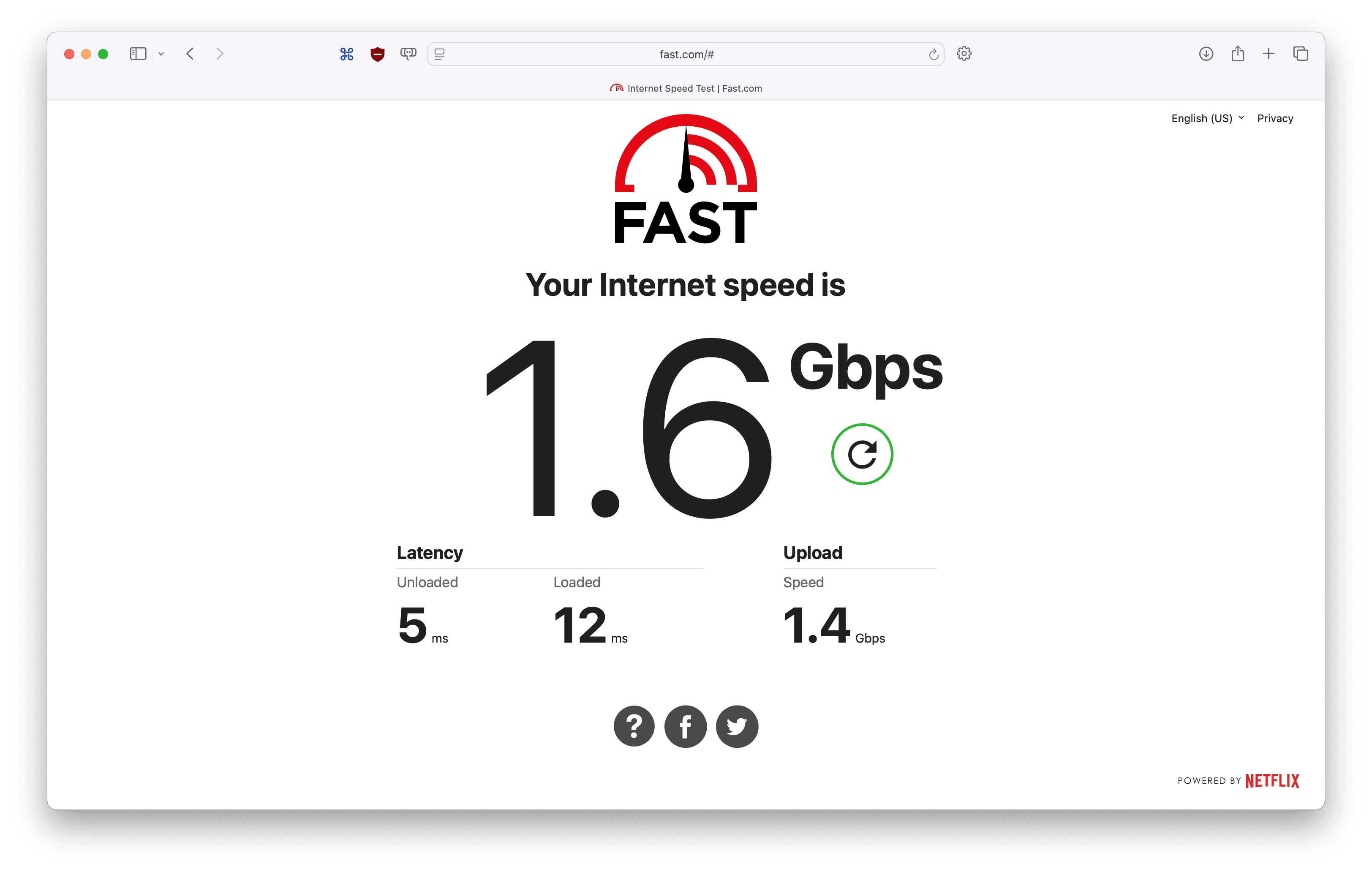
Current Wi-Fi speeds cap at approximately 1.6Gbps — far from the 10Gbps link. There are two bottlenecks preventing full utilization:
- Client-side: My MacBook Pro and MacBook Air only support Wi-Fi 6E, which maxes out at 160 MHz channel width (~2,402 Mbps PHY rate). Wi-Fi 7 clients with 320 MHz support would be needed to push beyond this.
- WAN-side: My ISP's modem does not support SFP+, so the UDR7 is connected via its 2.5Gbps WAN port instead of the 10Gbps SFP+ interface.
Fully utilizing the 10Gbps connection will require both Wi-Fi 7 client devices and an SFP+ handoff from the ISP.
Future Plans
To close the gap between the 10Gbps link and what I can actually use today, there are two upgrades on the list:
- RJ45 to SFP+ transceiver — My ISP's modem only has an RJ45 output, so the UDR7 is currently connected via its 2.5GbE WAN port. A 10GBASE-T SFP+ transceiver module will let me plug the RJ45 cable into the UDR7's 10G SFP+ WAN port, unlocking the full 10Gbps on the WAN side.
- 10GbE Thunderbolt adapter for my MacBook — Even with Wi-Fi 7 down the road, wired will always be faster and more reliable. A USB-C/Thunderbolt to 10GbE adapter will give me a direct 10Gbps wired connection from my MacBook when I need it.